
From ELIZA to ChatGPT: how conversational UI has changed
Chances are you’ve already encountered a conversational UI today. It’s pretty much everywhere these days. Whether you asked Siri what the weather will be like tomorrow, used a chatbot to find out when your package will be delivered, or asked ChatGPT to draft an email for you, it all falls under the umbrella of conversational UI, also known as Conversational User Interface (CUI).
Wat is conversational UI?
Simply put, conversational UI is a design pattern in which a user communicates with a computer in a human-like conversational format. This can happen through chat (chatbots), but also through voice (like Siri).
Nowadays, conversational UI is very often combined with AI to provide meaningful answers, because there's nothing more frustrating than a chatbot that doesn’t answer your question or simply doesn’t understand it.
This is where AI comes in. An AI-driven chatbot can handle unexpected input and, when something is unclear, ask targeted follow-up questions. Imagine a user accidentally enters their house number before their postal code instead of the other way around; a traditional chatbot would most likely get stuck here. An AI chatbot, on the other hand, recognizes that both pieces of information are present but in the wrong order, and asks for confirmation:
“Is your postal code 1234AB and your house number 56?”
Questions with typos are also very common. A traditional, script-based chatbot quickly runs into issues here, simply because the input doesn’t exactly match what the bot expects. Thanks to AI, conversational UI platforms have grown rapidly in recent years. But where did it all begin?
From ELIZA to ChatGPT
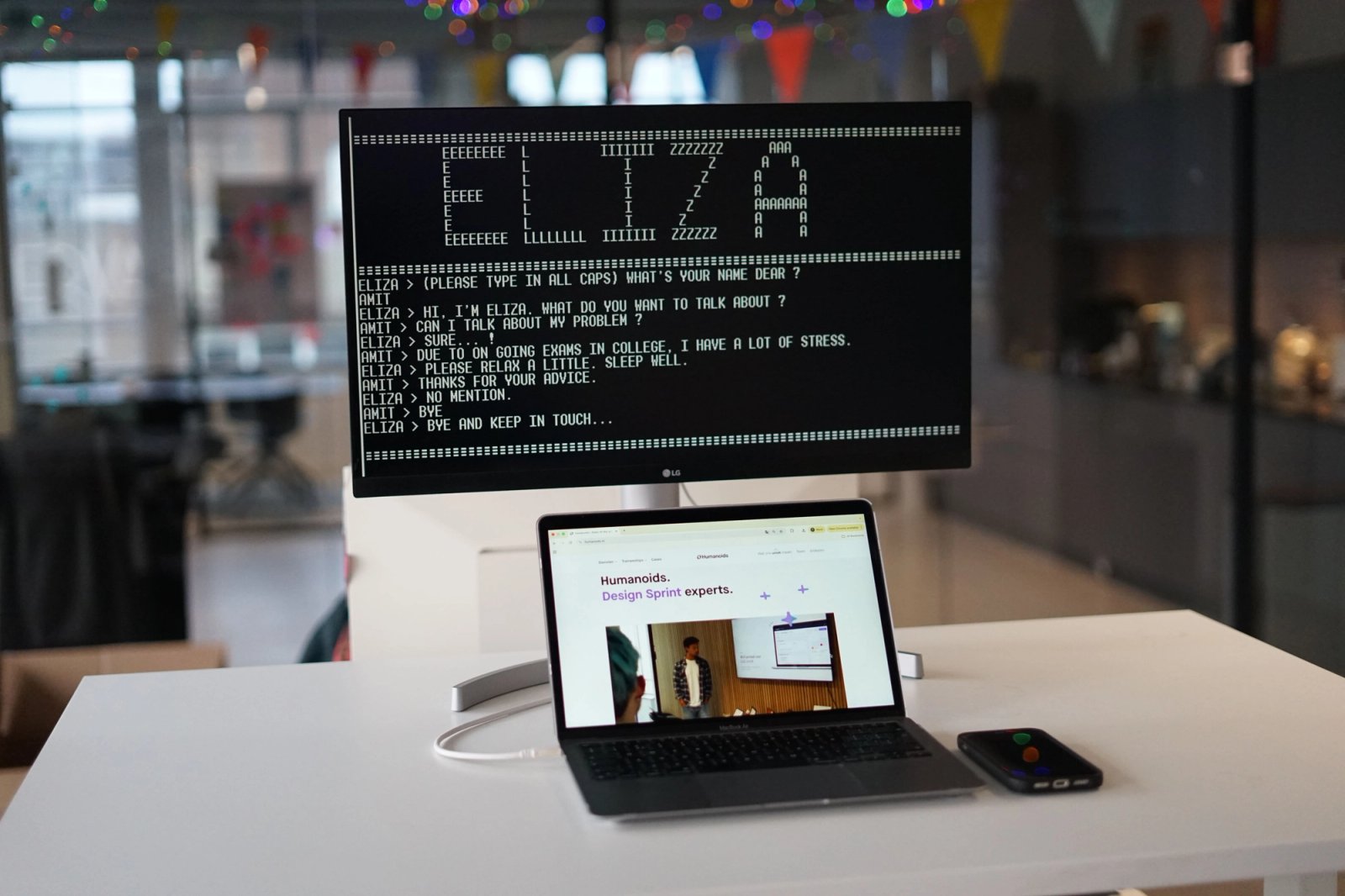
Most people have never heard of ELIZA, and that’s not surprising. ELIZA was built in 1966 by Joseph Weizenbaum and was the very first real chatbot. It was designed to simulate a psychotherapist.
Even though the technology behind ELIZA was still very limited, it showed that people didn’t find it strange to talk to a bot. In fact, people started sharing personal problems with ELIZA or simply chatting with it. Users even attributed empathy to ELIZA because it responded in a human-like way by rephrasing the user’s own questions.
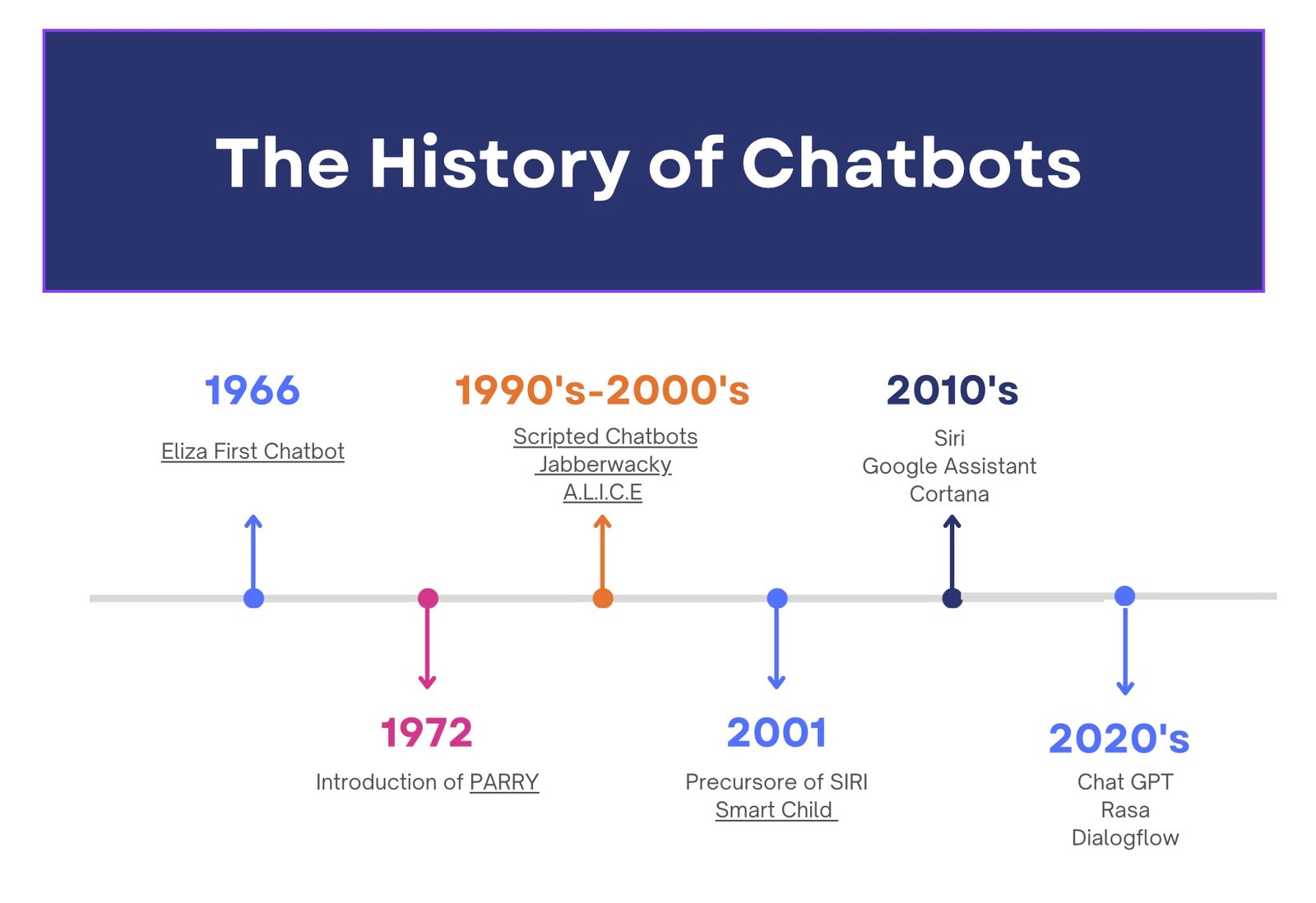
After ELIZA, several other conversational UI systems were introduced, such as Parry in 1972, ALICE in 1995, and SmarterChild in 2001. SmarterChild is now considered the precursor to Siri, which Apple launched in 2010. At its peak, SmarterChild had around 17 million users.
Siri became the blueprint for personal assistants like Google Assistant in 2012 and Cortana and Alexa in 2014. The most recent major conversational UI model is ChatGPT, which reached 900 million weekly users in February 2026. That translates to around 1 billion unique monthly users and more than 5 billion website visits per month. Of all users, 50 million have opted for the paid version.
The growth of conversational UI
Conversational UI is now growing at an incredible pace, as most UI bots are connected to AI systems to function effectively. The terms conversational UI and conversational AI are often used together.
Currently, the conversational AI market is valued at $13 billion, with projections estimating it will reach $50 billion by 2030 (MarketsandMarkets, 2024). In other words, an annual growth rate of no less than 25%.
We’ve now reached a point where the question is no longer whether companies should adopt conversational UI, but rather how they can implement it in the smartest way possible.
Conversational UI in practice
Today, conversational UI is used in almost every sector. In customer service, chatbots act as the first point of contact for users who want to ask questions outside office hours.
In e-commerce, conversational UI helps customers choose the right color or size. Chatbots can appear in the shopping cart when a customer hesitates during checkout. The bot can immediately offer assistance to remove doubts, potentially recovering up to 35% of abandoned carts (Rep AI, n.d.).
Conversational UI is also valuable in the B2B sector. Instead of filling out long HR forms for something like a leave request, employees can simply send a message via a chatbot, which can immediately process and submit the request.
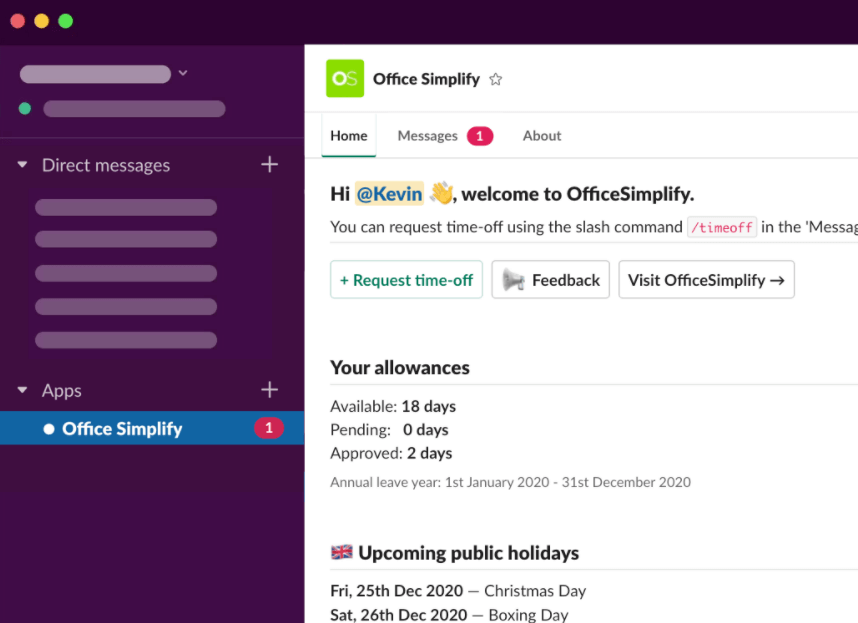
- Slack: Slack is a chat platform widely used by companies for internal communication. Through an HR bot in Slack, employees can submit a leave request without opening a single form. They simply send a message like, “I want to take Friday off.” The bot then asks a few short questions, checks the leave balance, and automatically forwards the request to a manager for approval.
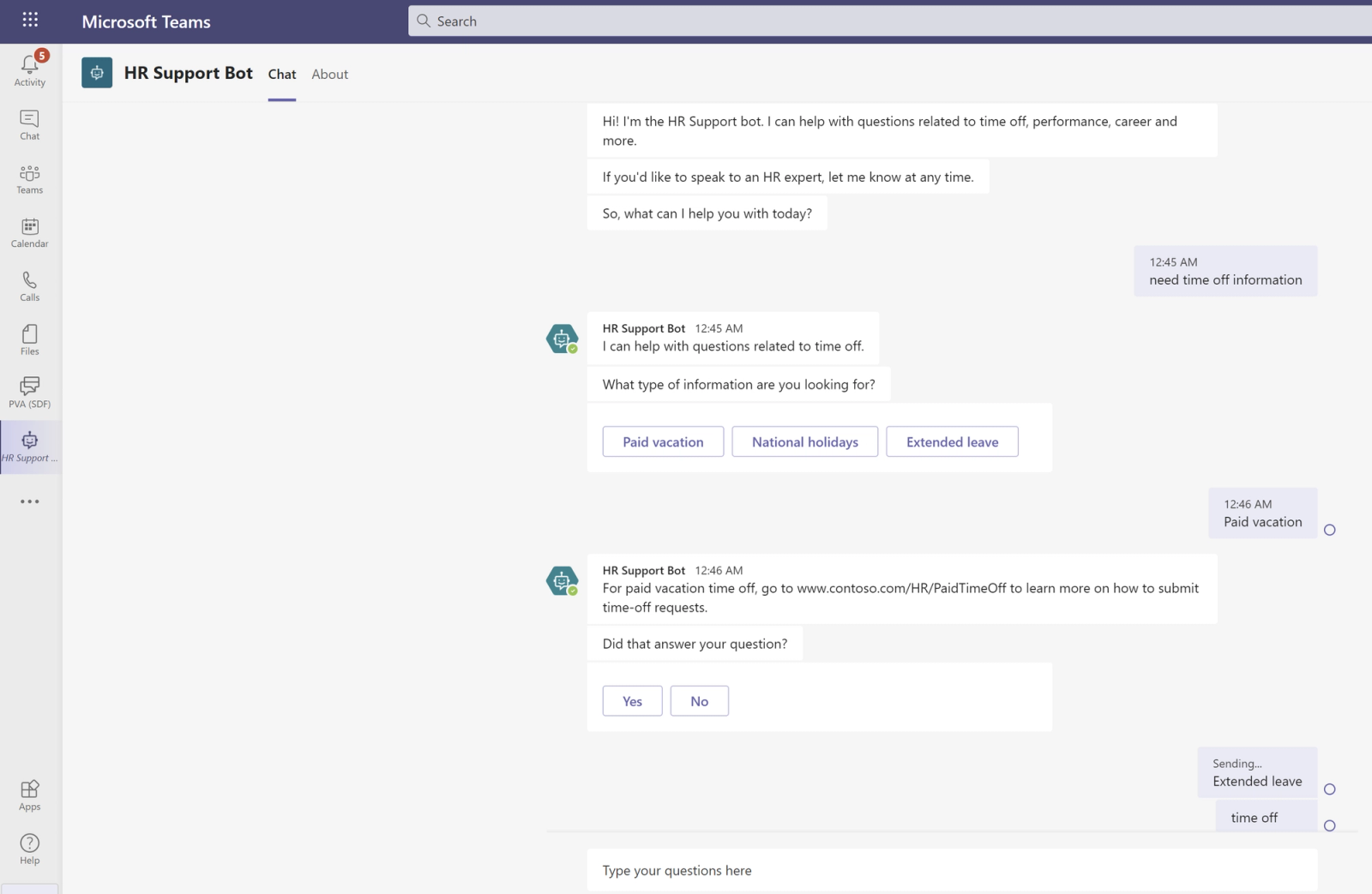
- Microsoft Teams with an HR-bot: Microsoft Teams, the meeting and chat platform many companies already use, can be extended with an HR chatbot. Employees just send a message like, “I want to take next Friday off,” and the bot handles the rest, checking leave balance and submitting the request immediately.
Chatbot conversational UI
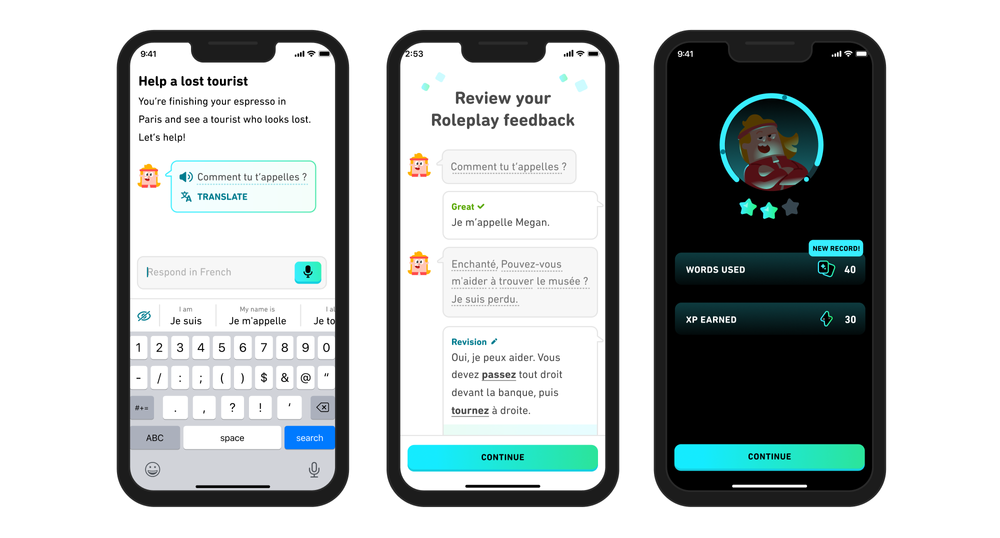
A well-known example of conversational UI is the Duolingo app. Duolingo is an AI chatbot that helps users learn a new language through short, interactive conversations, similar to chatting on your phone. This makes the lessons feel very accessible, as the interface is familiar to almost anyone who has ever sent a message.
Duolingo includes a feature where users have realistic conversations, such as ordering food in a restaurant or asking for directions. The chatbot responds to what you type, corrects mistakes, and provides immediate explanations.
Duolingo goes a step further with its video call feature (available in Duolingo Max, the paid version). Here, users have a spoken conversation with an AI character named Lily via a video call, similar to FaceTime. Lily responds to what you say and encourages you to keep the conversation going. Afterward, you receive automatic feedback on the accuracy and complexity of your responses, along with tips for next time.
Conversational UI vs Spoken UI
Terms like chatbot, voice UI, and conversational UI are often used interchangeably, but there are important differences. So when should you use a chatbot? And when is a voice UI more suitable?
Long story short: chatbots cannot replace every interface, but they work best when users want to ask questions or be guided step by step through a process. They tap into the feeling of a conversation, lowering the barrier to interaction. Chatbots are especially suitable for situations where users want to read, review, or calmly navigate information, for example:
- Retrieving and saving information
When users want to revisit answers, links, or confirmations
- Tasks within a website or app
Such as tracking orders, answering FAQs, or filling out forms
- Privacy-sensitive situations
When users prefer typing over speaking aloud (e.g., in public or at the office)
- Guided processes
Step-by-step flows like applications or decision-making
- 24/7 availability
A chatbot can continuously capture and structure questions for later follow-up
When is voice UI more useful?
Voice interfaces are better suited when speed, convenience, or hands-free use is important.
Examples include:
- Handsfree situations
Whilst driving, cooking, or exercising
- Quick actions and urgency
For example, initiating a call via voice ("Call emergency services")
- Telephone systems
Customer service menus where users speak instead of pressing buttons
- Accesibility
For people who have difficulty seeing or typing
The three limitations
One of the biggest pitfalls of conversational UI that uses AI is that AI can confidently provide incorrect information. This is known as “hallucination.” Chatbots that give wrong information about things like return policies or delivery times can cause more damage than having no chatbot at all.
A well-known example is a case involving Air Canada, where a chatbot provided incorrect information about a discount policy. A customer acted on this information but was later told the policy was different. The case ended up in court, where it was ruled that the company is responsible for the chatbot’s misinformation.
This becomes even worse when companies deploy multiple chatbots for different functions that simply aren’t ready yet. Bugs are inevitable, and they significantly reduce the usability flow for customers.
In longer or more complex conversations, an AI chatbot can quickly lose track. It may lose the full context of the conversation and provide answers that are irrelevant or even contradictory to what it said earlier. For users who are already frustrated, this is often the point where they drop off.
Because users often share personal or sensitive information with chatbots, strict privacy standards are essential. Companies must be transparent about how long data is stored and who has access to it. Failing to do so risks not only legal issues but also a loss of customer trust.
Tips for successful implementation
Successful UI doesn’t start with technology; it starts with understanding customer needs. A common mistake is investing in the most expensive AI software without a clear goal. The temptation to create an all-knowing AI assistant is strong, but in practice, that’s rarely a good idea.
By first focusing on a specific process, such as answering FAQs or scheduling appointments, you can fully optimize the interface before expanding its scope.
Transparency is key here. Customers need to know whether they’re talking to an algorithm or a human. A chatbot powered by AI should not present itself as a human employee. This not only sends the wrong message but can also damage the reputation if the bot says something incorrect.
There’s also nothing more frustrating than being stuck in a chatbot loop with no way out. If the AI chatbot can’t help, the user should be seamlessly handed over to a human colleague.
In conclusion
In less than sixty years, conversational UI has evolved tremendously, from ELIZA’s simple chatbot to AI tools like ChatGPT used daily by hundreds of millions of people. And that growth isn’t slowing down anytime soon.
For businesses, the message is clear: those who invest now in a well-thought-out conversational UI strategy are laying the foundation for a digital customer experience that is not only more efficient but also more human.