
Usability testing: what it is, why it works, and how to get started
Within 30 seconds, a user has already formed an opinion about your website or app. If that first impression is off, they'll drop out, and the chances of them coming back are slim. Usability testing is the way to find out exactly where things go wrong, making it essential for any product that wants to succeed in the market.
But did you know that usability testing has existed far longer than the internet itself?
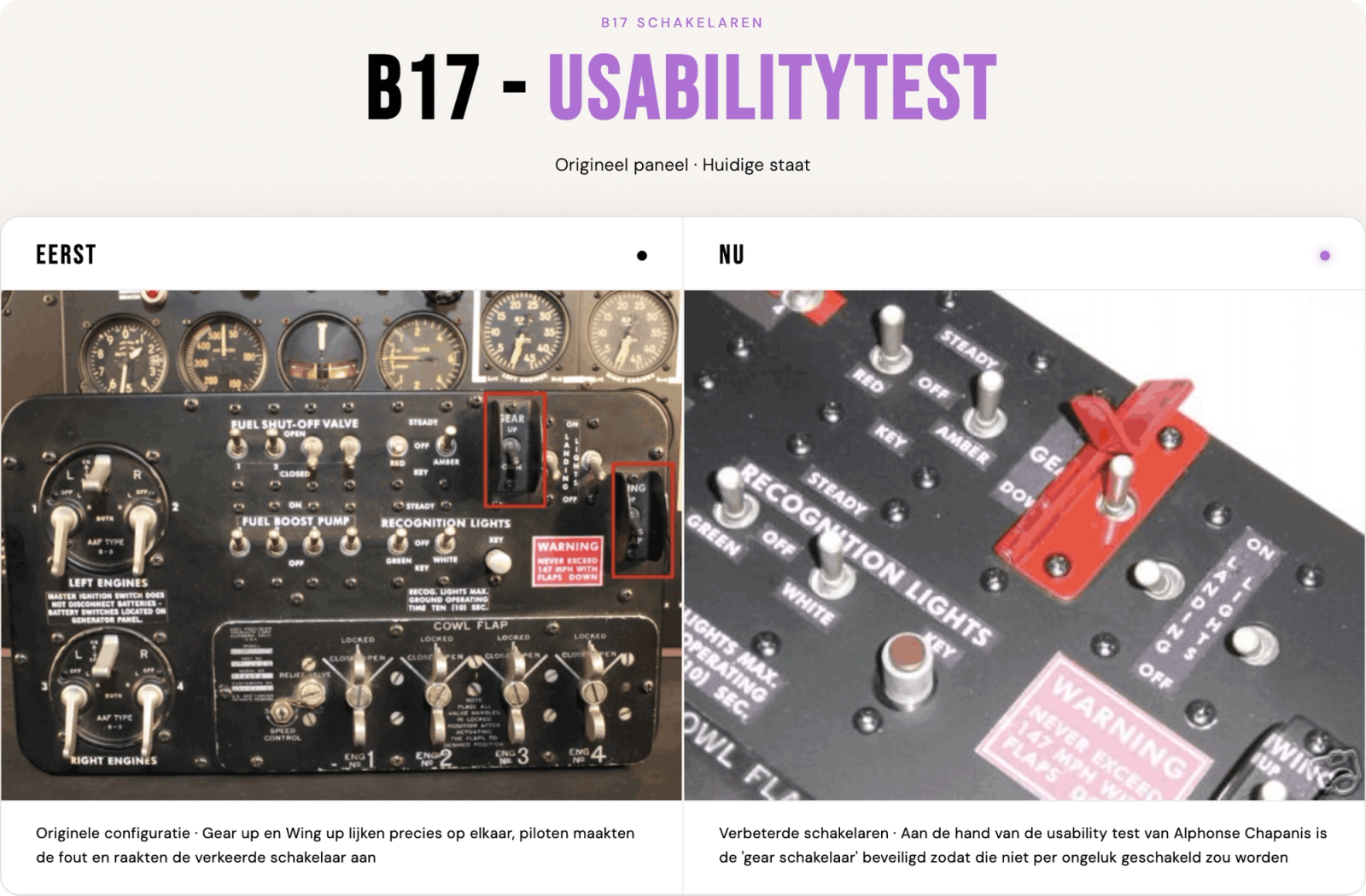
The first real usability test took place during World War II. American psychologist Alphonse Chapanis was asked to investigate a striking pattern: why were experienced pilots crashing during landing, with no technical cause to explain it? Chapanis quickly identified the culprit. The instrument panel of the bomber had two identical switches side by side: one for the flaps and one for the landing gear. Fatigued pilots would simply grab the wrong switch during landing, retract the wheels, and cause a crash.
The solution was as simple as it was effective. Chapanis redesigned the controls: the landing gear switch got a wheel-shaped knob, and the wing flap switch got a wedge shape. Two different shapes, zero confusion.
This small insight saved lives and laid the foundation for a field we can no longer imagine doing without in digital product development. Whether it's a cockpit or a checkout page: if a design doesn't align with how people think and act, something will eventually go wrong.
How many people do you need for a usability test?
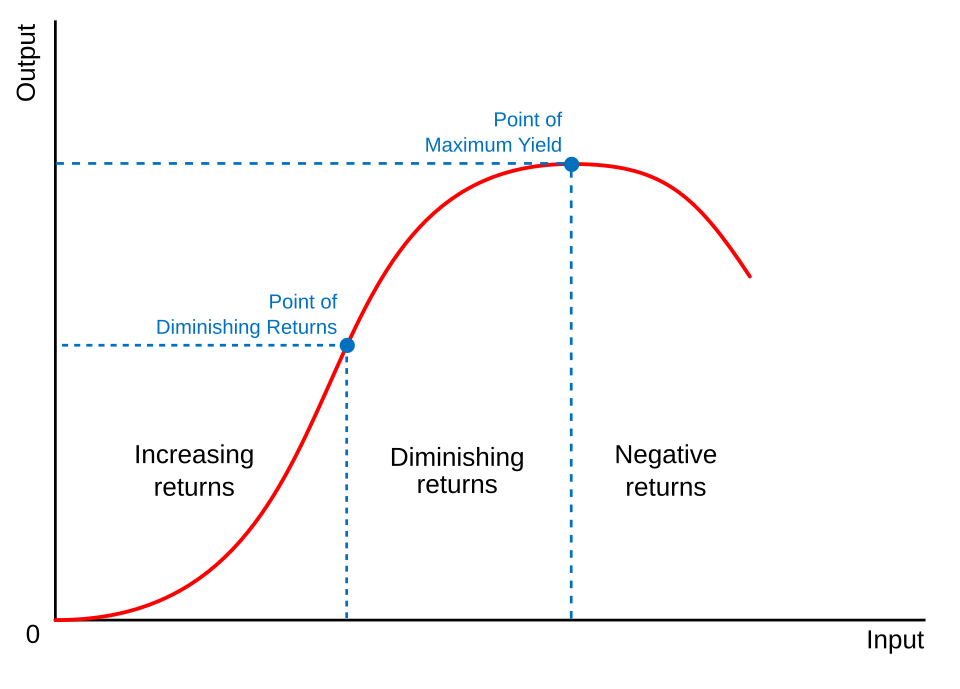
An important insight for anyone starting with usability testing is that you don't need many participants. According to usability expert Jakob Nielsen (2000), the optimal sample size is just 5 people. You can choose to test with more than 5, but after the fifth person, you'll typically get the same feedback, and new tests will barely yield any unique insights. This is known as the 'law of diminishing returns'. Running a usability test with more participants doesn't automatically mean better results. I'll come back to this later.
Respondents are selected based on the product's target audience. It's important to choose external users who are unfamiliar with your website or app. Colleagues already know the product too well and will navigate it very differently compared to someone seeing it for the very first time.
What are usability problems?
Usability problems come in many different forms. Making sure your product is easy to use is essential for your target audience. Users most commonly struggle with the following:
- Complex navigation: users get frustrated when a website is unclear and click away fast.
- Slow load times: a high bounce rate is often the result of pages that take too long to load. Large image files are a common culprit.
- Unclear labels and icons: users don't know what buttons or icons mean without the right labels or instructions.
- Too many steps: an ordering process or application form with too many intermediate steps creates drop-off points.
- Inconsistent design: varying styles, colours, or terminology throughout the website leads to confusion.
What's the point of usability testing?
Usability testing is a tool designed to understand how real users interact with your app or website. It's incredibly important that websites and apps are easy to navigate. Today, users have short attention spans and concentration windows, and competition is fierce. A poor user experience has a direct impact on a product's success.
Usability testing helps collect data from respondents and improve usability issues. Even the best app and web developers can always benefit from a good usability test. The biggest advantages are:
- Identifying design flaws early: a usability test helps prevent costly redesigns later in the development process.
- Improving user-friendliness: a user-friendly product leads to more satisfied users and makes it easier to win over new customers.
- Preventing a failed product launch: a poor launch can have negative consequences not just in the short term, but also for a company's long-term reputation.
Why a usability test often saves money
Many companies claim they 'don't have time' for a usability test. Yet those same companies spend time on:
- Answering support tickets
- Explaining the product to confused customers
- Building 'patches' for features that aren't understood
A usability test doesn't have to be large or expensive; the format varies depending on the situation. But identifying problems early saves not just time, but a lot of money too.
Earlier, I mentioned the law of diminishing returns. What exactly does that mean? This economic principle states that adding more input factors (such as usability test respondents) will, at some point, yield less additional output. Causing productivity and efficiency to decline. According to usability expert Jakob Nielsen (2000), the first 5 respondents will already uncover 85% of usability problems.
When you test with more than 5 users, you start seeing the same problems over and over again. The time and money spent testing the 6th, 7th, or 10th user yields very little new information. Testing 15 users in a single round is often a waste of resources, since the extra 10 users add barely any unique insights beyond the first 5.
What does the usability test process look like?
In a usability test, real users are asked to complete tasks with a product while a researcher observes where they get stuck.
There are several types of usability testing, but the three core roles always remain the same:
The facilitator (researcher) leads the session and must stay neutral, intervening as little as possible, so the respondent can work through their own thought process and provide valuable feedback.
The tasks vary per study, but the idea is always the same: they're situations that could realistically occur, so you can see whether a respondent can navigate them independently. A few examples from a real usability study by NNgroup:
"Your printer is showing 'Error 5200'. How can you clear the code?"
"You want to apply for a new credit card at Wells Fargo. Please take a look at the wellsfargo.com website and choose the credit card you'd want, if the right one is available."
"You're told you need to speak with Tyler Smith from the project management department. Use the intranet to find where they are located. Then tell the researcher what answer you found."
The respondent should represent a realistic user of the product. Respondents are often asked to think out loud during a usability test. This makes it easier for the facilitator to follow the thought process as the respondent works through the tasks.
Qualitative or quantitative: what do you need?
Before setting up a usability test, it's important to know what type of research you need. There are two kinds: qualitative and quantitative. Both have a different goal, a different approach, and a different ideal number of participants.
Qualitative research is about why and how users do something. The goal is to identify problems and gather insights about motivations, emotions, and behaviour.
- The goal of a qualitative usability test is to identify problems and collect insights for improvement.
- The questions are formulated so that the researcher gets a better understanding of how users feel and why they do or don't understand certain things.
- The methods commonly used here include one-on-one interviews and focus groups.
- The number of participants is small, as mentioned earlier, 5 participants are already enough to find 85% of usability problems.
- The data is non-numerical and takes the form of observations, quotes, and video recordings.
Quantitative research works differently. Here, the focus is on measuring performance and validating hypotheses through numbers.
- The goal is to confirm patterns, measure success rates, and establish benchmarks.
- The questions are concrete and measurable, such as: how long does it take to complete a task? What percentage of users fail at task X? How often is a particular feature used?
- The methods used here include surveys, A/B testing, analytics, and unmoderated remote tests.
- The number of participants is considerably higher; groups of 40 or more are perfectly normal, since you need statistical significance to draw reliable conclusions.
- The data is always numerical, in the form of time, success ratios, and error rates.
Which type you choose depends on the stage you're in. Use qualitative early in the design process, when you want to understand where users get stuck. Use quantitative methods later, when you want to measure how significant a problem is or how a change has played out. The rest of this article focuses primarily on qualitative usability testing, as it's the most commonly used method in the early stages of product development.
How long does it take to complete a usability test successfully?
The timeline of a usability test depends on several factors. The most important thing is the number of user groups you want to research. For reliable conclusions, you need around 5 respondents per group. On top of that, you need to factor in preparation time and the time needed to turn the results into a clear report.
For a simple application with one user group, you can complete the entire process, from recruiting respondents to drawing conclusions, in just a few days. That said, you'll want to start recruiting respondents and scheduling tests well in advance.
More complex projects take more time. A good example is the large-scale usability study we conducted for DHL around their chatbot Tracy. A national parcel service serves an enormously diverse audience: from older users with limited digital experience to young people who order a package every week. To get a proper reflection of all those users and test multiple scenarios, this project took around a month and a half.
In short, a usability test is custom work. The complexity of your product and the diversity of your target audience together determine how much time you need for a thorough study.
What challenges exist in usability testing?
Usability testing is a process that requires a great deal of preparation. The goal is to create a flow that's easy for potential customers to follow. At every drop-off point, there's a chance a customer decides to go with a competitor instead.
Here are a few challenges that are particularly important to be aware of:
1. Recruiting the right target audience.
Many companies have their usability tests conducted internally. This saves significantly on initial costs, but often doesn't provide a fresh perspective. Colleagues already know the website well, which means they navigate it very differently compared to someone visiting for the very first time.
By testing with real external users who have never clicked on your website before and who are part of your target audience, you more often get a fresh view of the website and how the flow actually works.
2. Answering the respondent's questions yourself.
During a usability test, respondents often feel the urge to ask the researcher questions, but that's not the point. The whole idea is that respondents figure out how the website works on their own. As a researcher, it's also tempting to say "Yes, you can do that," but in doing so, you immediately provide direction. The researcher must stay neutral and let the respondent do their thing.
The usability testing methods
There are four different user testing methods used most frequently:
- On-site testing
- Remote testing
- Moderated testing
- Unmoderated testing
Each approach has its pros and cons.
On-site testing
On-site testing means that people physically come to a location to test the product. This is usually a lab or a conference room. Invited users then test the workings of a website, app, or similar product. A moderator observes user behaviour and/or comments and can ask questions accordingly. Because questions can be asked right away, this form of usability testing is often qualitatively more valuable compared to remote testing.
A downside of on-site testing is that it's quite intensive. People have to actually travel somewhere, a room needs to be available where testing can easily take place, and the necessary equipment must be present on-site. Because it's so intensive, it's often considerably harder to find users who are willing to test your product.
Remote testing
Compared to in-person testing, a remote usability test follows the same concept. During a remote usability test, test users can easily run a test from home. Because users are typically in their own environment and using their own laptop or phone, the feedback is very realistic in nature.
Because the test method isn't on-site, the potential pool of people who can and want to test your product is considerably larger. The downside, however, is that it's harder to see the actual thought process. During a usability test, a camera can be on to show what the respondent thinks of various tasks, but it's still different from being able to physically see what's going through someone's head during a usability test.
Moderated testing
There's also a distinction between moderated testing and unmoderated testing. Moderated testing means there's a facilitator present who guides respondents through the process. Facilitators can also ask respondents questions in real time. For remote moderated testing, an online platform that enables live moderation is always used, such as Lookback.io, UserTesting, Trymata, and many other testing portals.
Unmoderated usability testing
The name says it all: unmoderated means the test user independently, without a mentor or guide, goes through an entire website, app, or product and answers a set of fixed questions based on their experience. Unmoderated testing very often follows a fixed structure with various tasks they need to complete, after which they give feedback on how they felt the process went.
The advantage of unmoderated testing is that it remains very flexible and is also considerably more affordable compared to moderated testing. There are a few downsides, however: unmoderated testing sometimes yields less contextually relevant answers, and it's harder to ask follow-up questions.
User testing in 2016 versus 2026
Until the 2010s, most usability tests were conducted in controlled, in-person environments, because wifi was still too slow back then, and screen sharing was considerably more difficult compared to today. The biggest push towards remote testing came in 2020 with COVID-19, after which remote testing definitively went mainstream. Today, remote testing is the norm, although in-person testing is still more valuable for truly observing users' pain points.
Can AI tools like ChatGPT and Claude help with usability testing?
AI tools like ChatGPT and Claude can certainly help, but they should be used as a tool, not as a replacement for real usability test respondents. The fundamental difference is that AI doesn't simulate real user experience: it works based on patterns and averages, not based on the behaviour of your specific target audience with your specific product. Think, for example, about:
Automating test questions
AI tools like ChatGPT or Claude can automatically generate a set of questions for the user, rather than spending hours brainstorming what kinds of questions you want to ask in your usability test.
Analysing feedback
Perhaps where ChatGPT and Claude excel the most: going through a lot of information very quickly. Reviewing user feedback one by one takes a long time, while AI tools can easily summarise everything and highlight the most important points.
Where AI tools fall short in usability testing
UXstudio investigated exactly where LLMs like ChatGPT and Claude get stuck. Their research shows that AI tools are certainly useful in a usability testing process, but that the feedback these tools provide isn't specific enough.
ChatGPT primarily talks about design problems in a surface-level way. It can't observe real user sessions, track live behaviour, or register contextual reactions the way a respondent does.
"Users may not know what certain buttons or icons do without the right labels or instructions." – ChatGPT
Here, ChatGPT points out an inconsistency with the icons, but doesn't clarify which icon, what exactly isn't clear about it, or where on the website it appears. That's the biggest difference between an AI tool and a real usability test: with a real test, you know exactly which elements don't work and why.
Usability testing doesn't have to be complicated. You don't need a big budget, an expensive lab, or dozens of participants. Five people, a clear task, and a neutral researcher are already enough to expose the most important pain points in your product. The question isn't whether you should run a usability test; it's when you start.
Curious about how to use AI smartly alongside a usability test? In our next article, we'll dive deeper into that.